HFT Engine Latency - Part 7: CPU Pinning
Don't interrupt my trading!

Introduction
In an earlier article we looked at some server tuning techniques used to reduce HFT tick-to-trade latency. We continue that theme here by examining two additional operating system optimisations commonly used in HFT: CPU pinning and isolation.
We will explain the problem these techniques solve, demonstrate how they can be applied, and measure the performance improvements gained.
Interruptions
An earlier optimisation we enabled was thread spinning. This gave a solid latency boost, because our application no longer wastes cycles being suspended and resumed while waiting for market data to arrive from the network.
However, there is another form of interruption that can affect even a spinning thread. This comes from the Linux kernel itself, when it decides there is some other work a CPU needs to perform.
These interruptions are scheduler preemptions and hardware interrupts. In both cases, a running thread - which could be our trading engine - may be temporarily halted while the kernel performs another on-demand activity.
Lets look at each of these in turn.
Interrupts
A typical example of a hardware interrupt for a trading application is NIC (network interface card) handling. When packets arrive from the network, the NIC raises an interrupt which is delivered to one of the CPU cores. That core briefly stops what it is currently doing to allow the kernel to process the interrupt.
If our critical spinning thread happens to be running on that core, it will be paused while the interrupt is handled. After the interrupt handler completes, the thread is resumed. Although these pauses are brief - perhaps hundreds of nanoseconds or up to a microsecond - in HFT systems they are significant. In market data environments packets arrive from the network at very high rates, so even these tiny interruptions can quickly accumulate and degrade trading latency.
Scheduler
Another source of interruption is when the OS scheduler decides to run another program on a core currently executing a critical thread.
For example, if a user on the server starts copying a file, or some routine monitoring job runs, the kernel may temporarily schedule out our trading engine to allow the other program to receive its share of CPU time.
The scheduler may also decide to migrate our thread to another core. This is particularly harmful for latency sensitive applications, because it destroys CPU locality. When a thread moves to a new core, it loses much of the state it built up in the previous core’s caches and branch predictors, forcing the CPU to rebuild that state. This introduces additional and unpredictable latency.
Overall, the kernel is not trying to optimise latency for our trading engine. Its goal is overall system-wide fairness, throughput, and responsiveness. For HFT these behaviours pose a problem: even a carefully optimised spinning thread can still be interrupted or migrated by the operating system.
Pinning & Isolation
The good news is that many of these interruptions are under our control, and in HFT environments they are resolved by adopting a carefully considered CPU pinning policy.
The general principle is to separate critical application threads from all other non-critical processes and activities.
We designate a small number of CPU cores to handle operating system tasks, interrupts, and non-critical programs. These are sometimes informally called junk cores. The remaining cores are reserved exclusively for the trading applications, which runs only on these isolated cores. In other words, one set of cores handles all system & background activity, while a separate set is dedicated to latency critical threads.
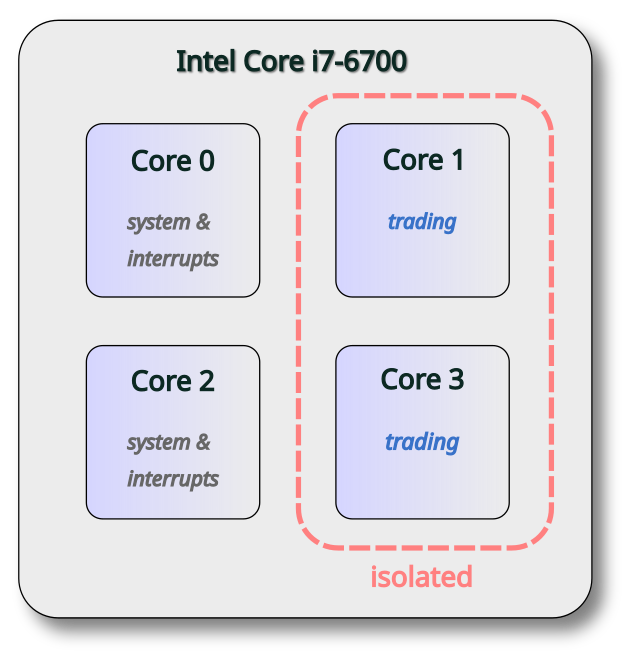
The current server used is an Intel Core i7 with four cores. We allocate two cores for system activity, leaving two for the exclusive use by the trading application. This policy is illustrated in the following diagram.
On Linux, there are several ways to implement a CPU pinning policy. For this demonstration, the following methods were used:
isolcpus kernel parameter
interrupt pinning after startup
application thread pinning with taskset
These changes described next.
CPU isolation
To restrict operating system tasks to the system cores, the kernel command line was modified to include options that isolate selected cores from various system activities. The following image highlights the changes made.
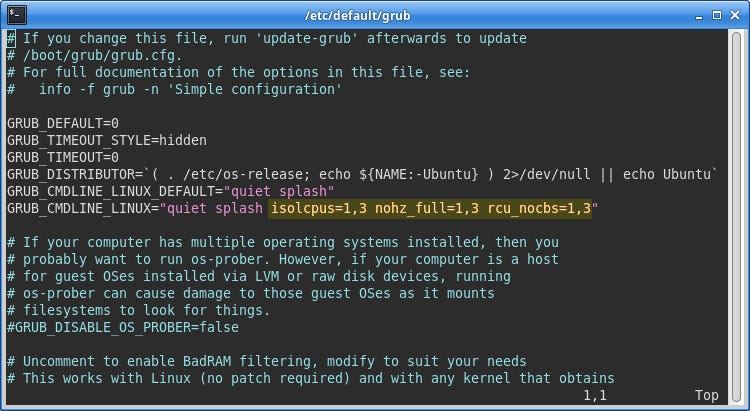
The isolcpus parameter specifies a list of cores that the scheduler will ignore. This prevents new processes from being assigned to these cores and stops the scheduler from migrating processes on or off them.
Additional parameters, nohz_full and rcu_nocbs, further reduce background activity. They reduce periodic timer interrupts and certain kernel housekeeping tasks, from running on the isolated cores, further helping to create a quieter execution environment.
Interrupt pinning
Hardware interrupts, including those from the network card, are pinned just after boot. The following small script was written to be executed automatically at startup. It identifies interrupt IDs and assigns them to system cores. Note that the CPU selection uses a binary mask here, where each bit identifies a different CPU core.
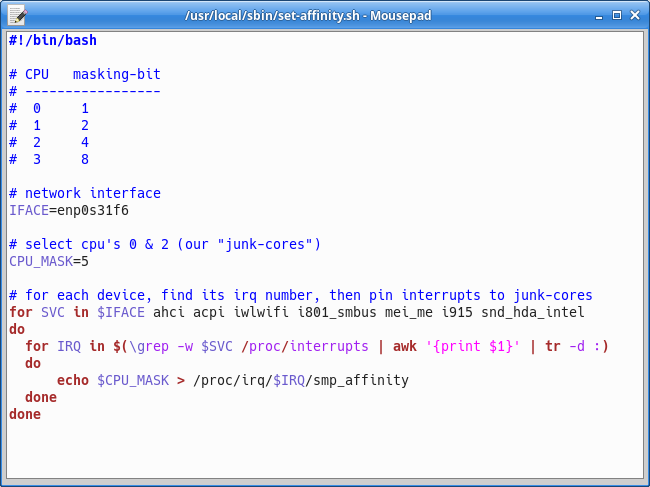
Any irqbalance service that might be running on the server should be disabled to prevent the scheduler from later moving interrupts away from the system cores.
Application Pinning
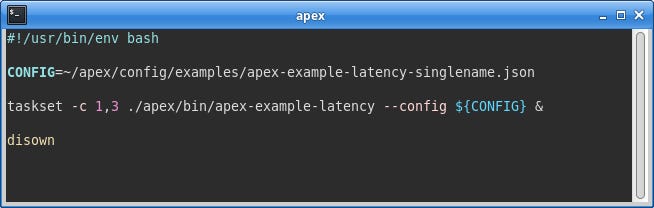
To pin the Apex engine to the isolated trading cores, the taskset utility is used as a prefix when starting the engine, specifying the cores on which the application is permitted to run.
In the screenshot below, taskset is configured with cores 1 and 3, which correspond to the isolated trading cores. It then starts the specified program (the Apex engine) and restricts its execution to those cores.
Monitoring
Once the pinning changes have been applied and the server rebooted, we should verify that the configuration is behaving as expected.
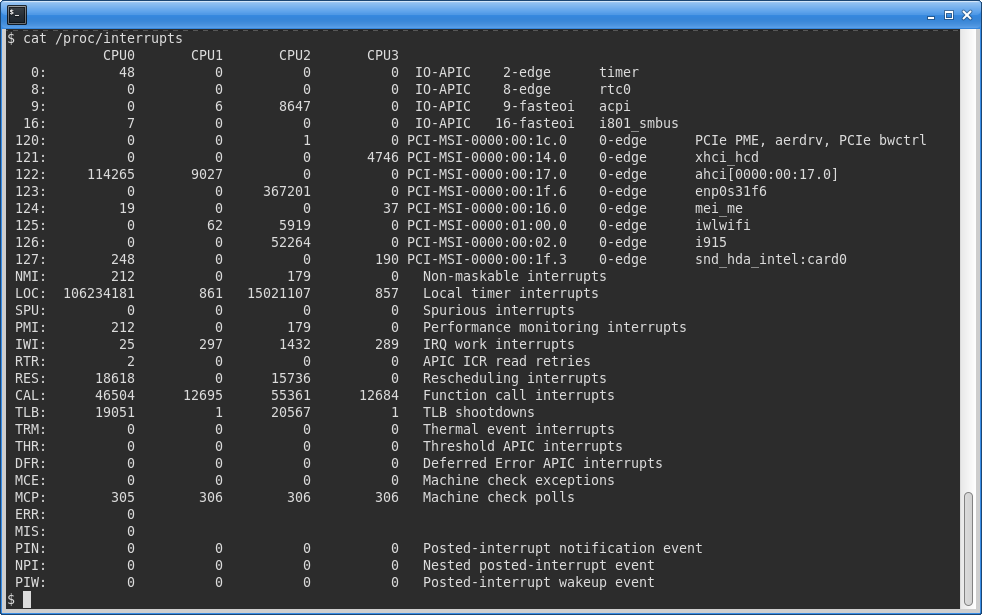
This can be done by inspecting the /proc/interrupts virtual file, which provides statistics on hardware interrupt activity across CPU cores. This file is updated in real time, so it is useful to briefly monitor how it changes using a command such as:
watch -d “cat /proc/interrupts”The screenshot below shows this file for the tuned server. The isolated cores (columns CPU1 and CPU3) report much lower interrupt counts compared to the system cores. A key source of interrupts - the network interface enp0s31f6 - is delivering its interrupts to only core number 2.
Performance
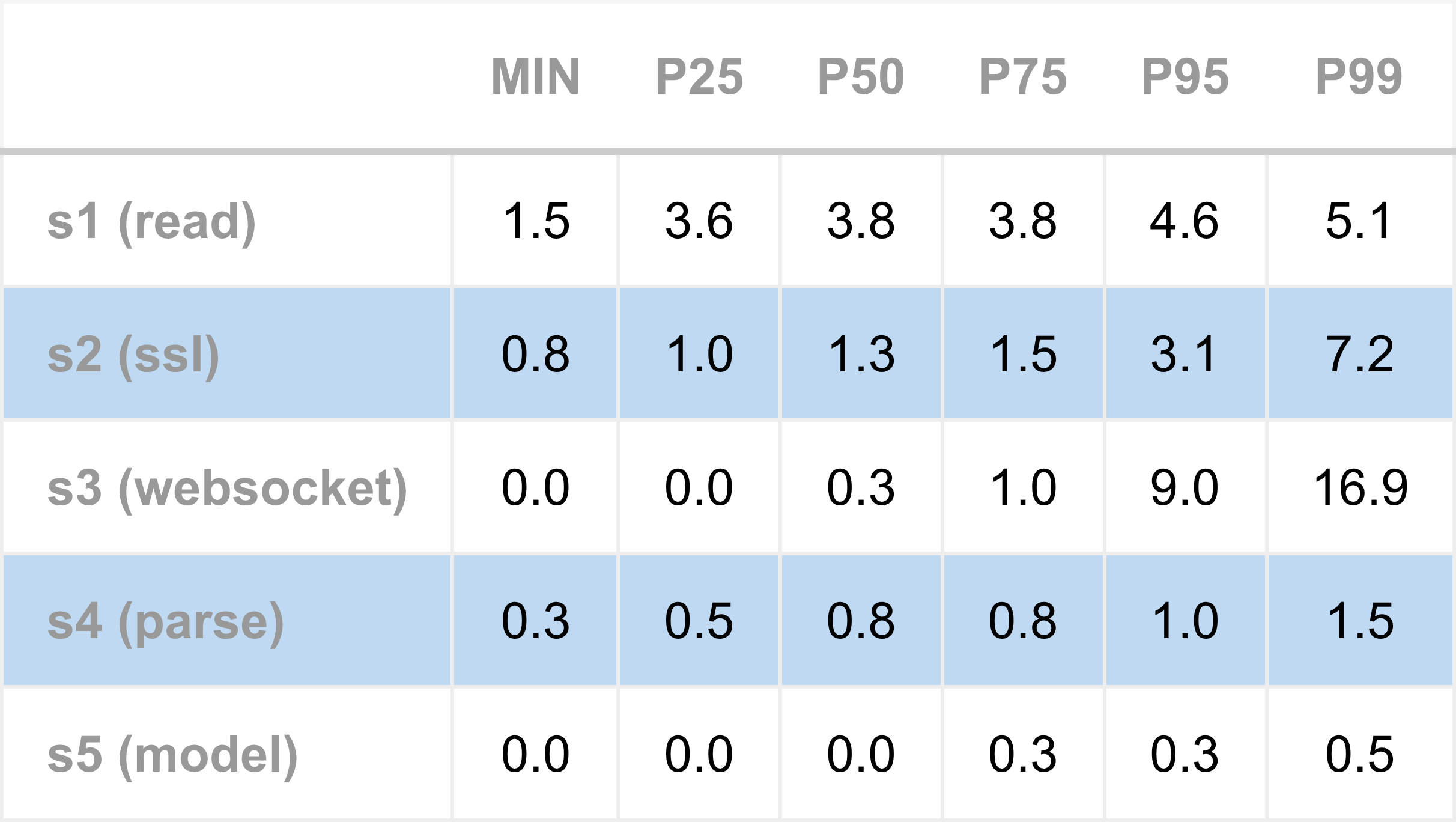
To measure the performance impact of CPU pinning and isolation, Apex was run and timing measurements collected. As in previous articles, Apex was tested under two configurations: subscribed to a single name to simulate the lowest-latency conditions, and subscribed to four names, to replicate higher load conditions.
The following table shows the tick-to-model latency for the single name configuration. The typical total latency ranges from 5 to 7 microseconds, increasing moderately around the 95th percentile, indicating that queuing effects start to occur.
These are strong numbers, but the more interesting comparison is against the baseline configuration, which is spinning without a pinning policy (as measured previously). That is shown next, which compares total inbound tick-to-model latency across a range of percentiles.
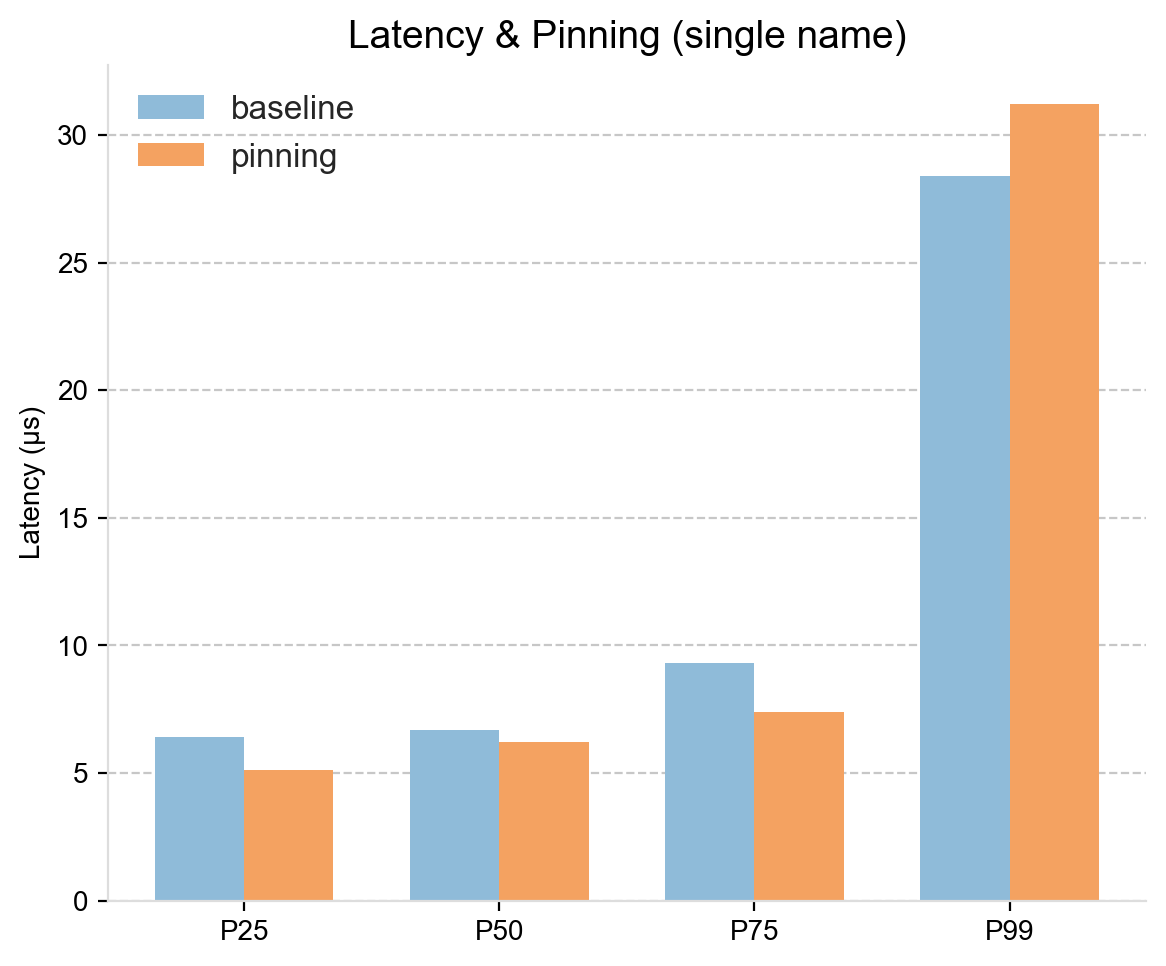
For the lower and medium percentiles, the pinning approach shows a consistent advantage. Latency improvements range from around 0.5 microseconds at P50 to nearly 2 microseconds at P75. While 0.5 microseconds is small in absolute terms, it is meaningful within HFT latency budgets.
At the 99th percentile, the latency is slightly higher under the pinning configuration. This is not surprising: at extreme percentiles, the system no longer measures just the cost of processing a single market data message, but also delays due to queuing. Bursts of messages arrive, and have to wait their turn to be processed, and this queuing delay can outweigh the microsecond level gains from pinning.
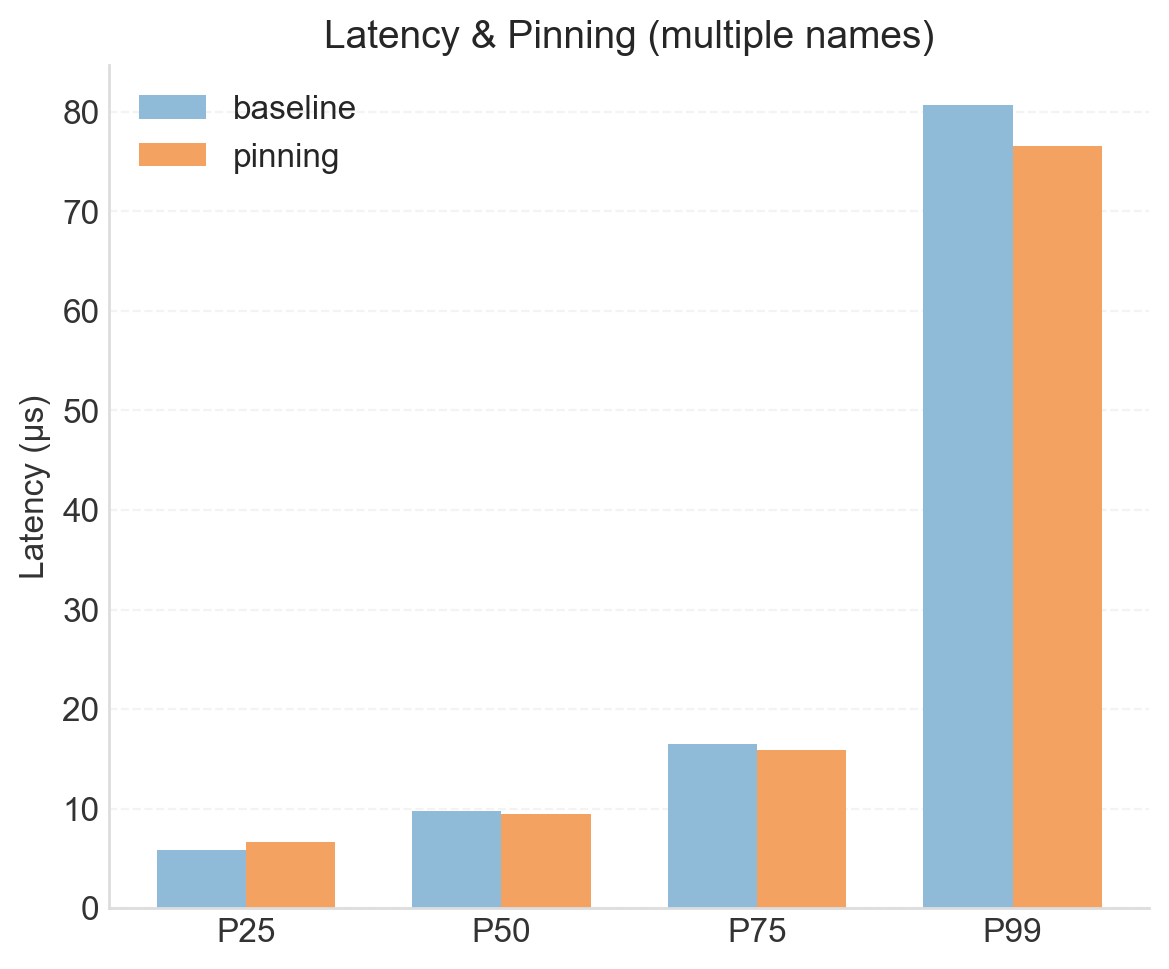
The next bar chart compares the pinned setup to the baseline for the four subscriptions run. Here, there is less evidence for a consistent advantage for pinning. With multiple subscriptions, queuing effects begin to influence latency even at lower percentiles, which swamps the marginal gains from CPU pinning. As a result, improvements seen in the single-name configuration are largely masked under higher load conditions.
Summary
This article has presented the tuning techniques of CPU pinning and isolation. These optimisations dedicate CPU cores exclusively to the trading engine, providing uncontested resources for latency critical threads.
This approach demonstrates a consistent benefit in low latency scenarios, particularly when subscribed to a single name. The improvements are modest - often under a microsecond - but are meaningful within typical single digit tick-to-trade latency budgets. For the highest level of optimisation, when spinning threads are enabled, CPU pinning and isolation should be used.
These techniques reflect a core principle in low-latency system design: time critical application threads should run on dedicated cores. Interrupt handlers, operating system tasks, and ad-hoc programs introduce unpredictable pauses. By isolating cores for trading, these interruptions are prevented, ensuring predictable and faster performance for the activities that really matter.
The test server used for this study is modest, offering only four cores. The deliberately chosen pinning policy dedicated two cores to system tasks and two to trading. This illustrates an important constraint. As HFT deployments scale and the number of spinning threads increases, each requiring its own isolated core, servers can quickly “run out” of cores.
Real-world HFT environments address this constraint by using servers with a higher number of cores (16 or more). With two cores set aside for the system, this leaves sufficient CPU resources to accommodate many spinning threads, including trading engines, market data feeds, and order-entry gateways. Dual-socket machines further increase CPU availability, but additional effort is needed to pin application threads to maximise memory locality within NUMA domains, minimising unnecessary cross-socket access.
Another challenge in successfully deploying pinning and isolation is coordinating application and system configuration across multiple levels. Kernel parameters, post-boot interrupt assignment scripts, and application config files all need to be aligned to implement a carefully designed pinning policy. This is a devops challenge that should not be overlooked.
A limitation of the current approach is that the entire Apex engine is pinned to the trading cores (a consequence of using taskset). As a result, not only the critical trading thread but also lower priority application threads compete for the same CPU resources, which is sub-optimal. In future work, we will pin only the critical threads, keeping non-critical threads separate to minimise interference. We will also use higher-core-count servers, providing enough isolated cores for additional spinning threads.
Achieving consistent low latency is not just a matter of writing faster code, but also of controlling where and how that code executes.